Mastering OSRS Bots: Human-Like Automation
Feb 2024 by Milap Savla
Tools Used: Python3, OpenCV (cv2), pyHM, pyautogui, SystemCursor
Math/Techniques Used: Gaussian Distribution, Randomized Delays, Human-Like Mouse Movement, Linear Interpolation and more.
Contents:
- Jagex's Bot Detection Measures – Understand how they work and strategies to counter them.
- Human-Computer Interaction – What human randomness looks like and how to simulate it.
- Further Detection Evasion Strategies – More advanced ideas and strategies

1. Jagex’s Bot Detection Measures
Jagex employs various methods, many of which rely on automation and machine learning, to detect botting activity. While some methods remain speculative, the following are well-known:
Fresh Accounts New accounts are monitored heavily, especially those with under 50 hours of playtime or minimal progress (e.g., low-level skills or quest points). To bot extensively on a single account, invest time in manual early-game progression to reduce suspicion.
Inhuman Behavior Actions like cleaning an entire inventory of herbs in under a second or exhibiting unnatural instant mouse movements are obvious red flags.
Mouse Movement and Click Analysis Repeating the same clicks with fixed delays is easily detectable. Jagex likely employs machine learning to recognize these patterns. Basic randomization isn't enough; we'll cover Gaussian randomness later to demonstrate what human-like behavior truly looks like.
Client Modification Detection Using third-party clients is risky, as Jagex can detect them. Stick to the official OSRS client or RuneLite via Jagex’s launcher to stay under the radar.
Player Reports and Moderation Other players can report bots, leading to targeted investigations. Avoid isolated areas; instead, bot in crowded spaces (e.g., W302 Grand Exchange) to blend in.
"Bad" IP Addresses Accounts associated with IPs flagged for botting are at higher risk. Use a clean IP or a VPN. Be cautious: shared VPNs may not always provide anonymity, but Jagex cannot outright ban players for using them due to legitimate users being on shared IPs.
Machine Learning Pattern Recognition Modern machine learning techniques can analyze patterns in mouse movements, clicks, and keyboard inputs. Even repetitive tasks performed by human players have subtle nuances that bots often fail to replicate.
2. Human-Computer Interaction
Bots are most often detected by their inability to replicate human-like randomness convincingly. Here's how humans differ from basic scripts:
Human Randomness vs. Computer Randomness
Adding delays to your bot is standard practice. However, the problem lies in how randomness is generated. Basic random number generation can result in evenly distributed outputs, which look artificial:
Example of Uniform Randomness Distribution:
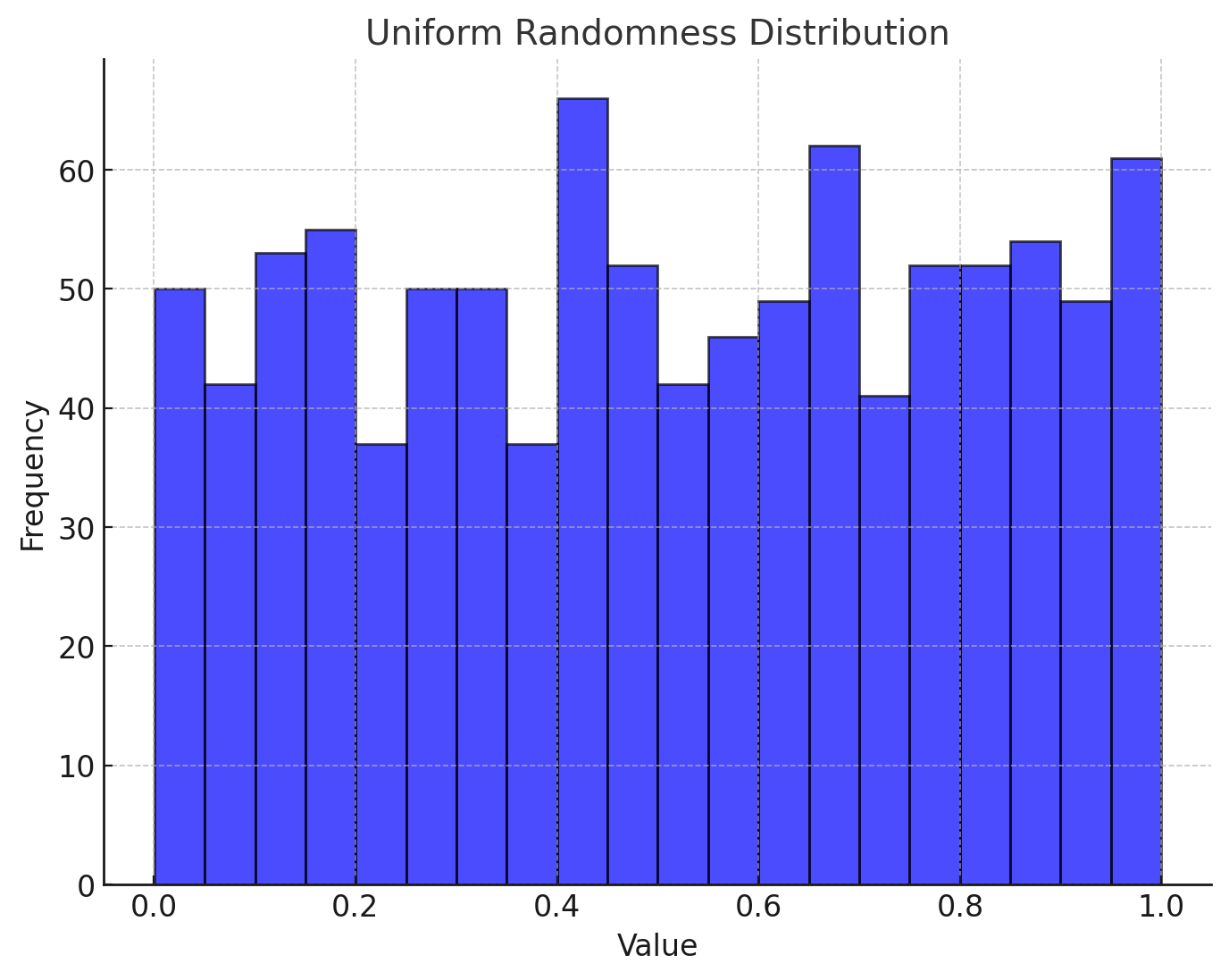
Instead, you want a Gaussian (or normal) distribution, where most values cluster around the mean, creating a bell curve:
Gaussian Distribution:
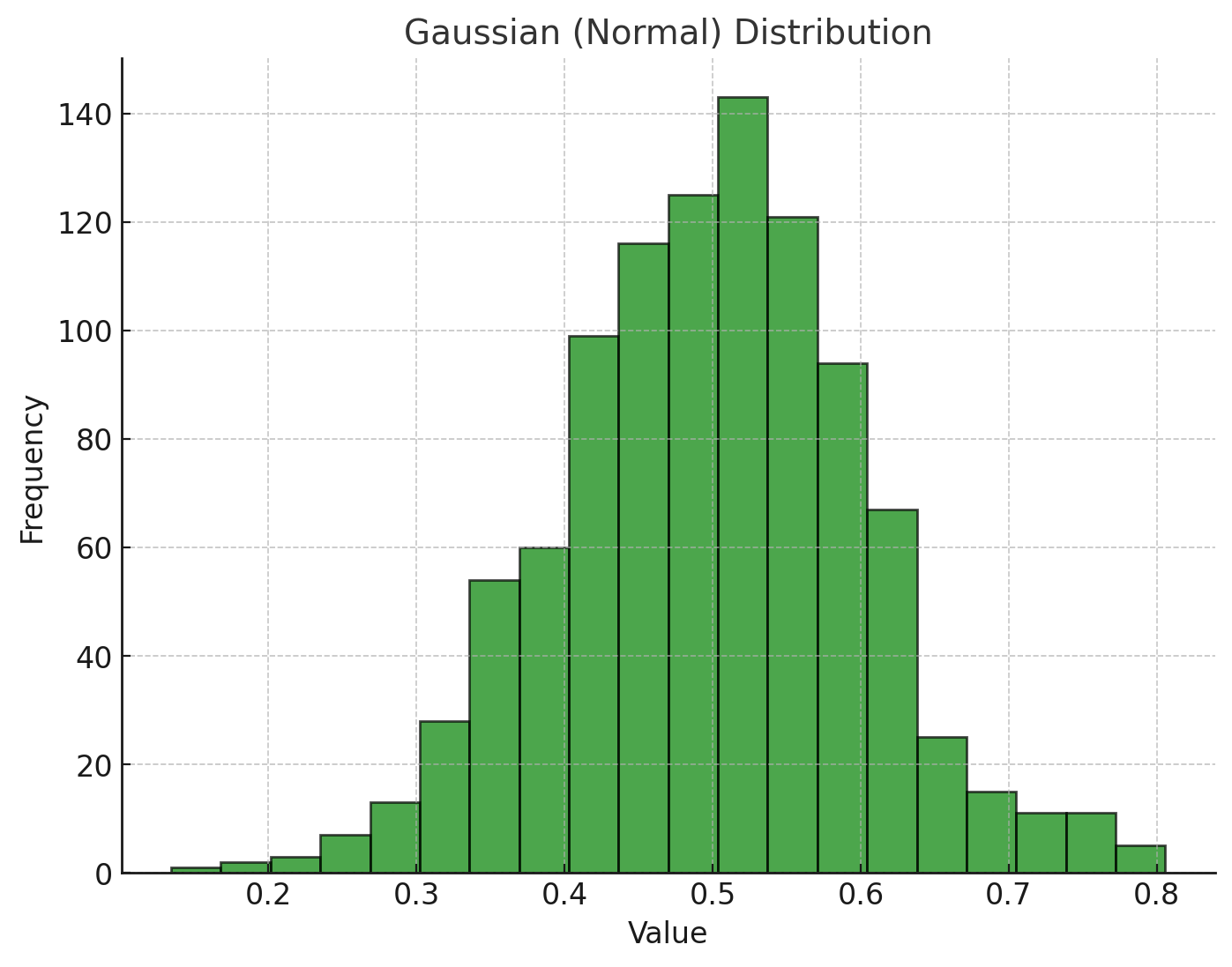
Here's a Python function to generate Gaussian-randomized numbers:
import random

def rand_g_number(base_value, modifier, min_val, int_check):
    while True:
        gaussian = random.gauss(0, 1)
        if gaussian < 0:
            base_value += modifier
        mod = modifier * gaussian
        result = base_value + mod
        if result >= min_val:
            break
    if not int_check:
        return round(float(result) / 10, 1)
    else:
        return int(result)

# Example usage
randomized_value = rand_g_number(2, 5, 0.02, False)
print(randomized_value)
This function generates a human-like randomness that avoids predictable patterns.
Practical Applications of Gaussian Randomness
Apply this randomness to all interactions your bot performs:
- Mouse Click Speed/Time: A mouse click consists of a press-down and a release-up action. Use Gaussian randomness for the delay between these actions (e.g., 0.04–0.2ms) and between subsequent clicks.
- Keypress Delays: Humans don't type at perfectly consistent speeds. Add Gaussian randomness to delays between keypress-downs and keypress-ups and avoid excessively fast typing.
- Mouse Cursor Movement: This is a critical aspect of creating undetectable automation scripts for applications like OSRS. To simulate realistic behavior, it's essential to mix techniques to emulate human variability. Two useful Python modules for this purpose are pyHM and SystemCursor. Alternating between these modules randomly can help diversify your bot's movement patterns and make detection less likely.
Below is an example function that demonstrates how to achieve this. The function takes x and y coordinates as inputs and uses either the pyHM module or the SystemCursor module to move the mouse to the target position. It incorporates Gaussian randomness to adjust the movement duration, further mimicking human-like variability. By combining these approaches, you can create a bot that blends natural and consistent behaviors effectively.
Human mouse movement function:
from pyHM import mouse
from humancursor import SystemCursor
import random
cursor = SystemCursor()

def human_mouse_move(x, y):
    duration = round(rand_g_number(2, 3, 0.1, False) + random.uniform(0.02, 0.1), 3)
    # Randomly choose between movement techniques
    if randint(1, 2) == 1:
        # use System cursor module
        cursor.move_to([x, y], duration=duration)
    else:
        # use pyHM module
        mouse.move(x, y, duration*10)
Human mouse click function with Gaussian randomisation:
def human_click(button_select='left'):
    duration = rand_g_number(10, 150, 10, True)/1000
    pyautogui.mouseDown(button=button_select)
    time.sleep(duration)
    pyautogui.mouseUp(button=button_select)
3. Further Detection Evasion Strategies
3.1) Dynamic Task Switching
Most bots fail due to repetitive behavior. Real players often take breaks or switch tasks unexpectedly. This section can cover how to integrate dynamic task switching to emulate human-like unpredictability.
How to implement
Weighted Random Task Selection: Use probabilities to decide which task the bot performs next. Tasks with lower weights can represent less frequent actions.
import random

  def weighted_task_selection(tasks):
      total_weight = sum(task['weight'] for task in tasks)
      rand = random.uniform(0, total_weight)
      current = 0
      for task in tasks:
          current += task['weight']
          if current > rand:
              return task['name']

  tasks = [{'name': 'fish', 'weight': 70}, {'name': 'bank', 'weight': 20}, {'name': 'walk', 'weight': 10}]
  next_task = weighted_task_selection(tasks)
  print("Next task:", next_task)
3.2) Advanced Statistical Modeling of Player Behavior
Analyze real player data (e.g., mouse movements, click intervals, task durations) to create a profile of typical behavior. Tools like pandas and matplotlib can help visualize and analyze these trends.
Building a Behavioral Model:
- Fit data to a Gaussian Mixture Model (GMM) to simulate variability in player
- Use Markov Chains to model transitions between tasks or game states.
import numpy as np

    def next_state(transition_matrix, current_state):
        return np.random.choice(len(transition_matrix), p=transition_matrix[current_state])

    states = ["fishing", "banking", "walking"]
    transition_matrix = [
        [0.7, 0.2, 0.1],  # Probabilities for fishing
        [0.1, 0.8, 0.1],  # Probabilities for banking
        [0.3, 0.3, 0.4],  # Probabilities for walking
    ]
    current_state = 0
    for _ in range(10):
        current_state = next_state(transition_matrix, current_state)
        print("Current state:", states[current_state])
3.3) Mimicking Social Interactions
Real players respond to game events and interact with others. You can script basic responses to chat messages or simulate clicks on random NPCs or objects.
Advanced Social Techniques:
- Simulated Conversations: Generate plausible responses to public chat using AI models (e.g., OpenAI’s GPT or similar. Google's Gemini has a free API).
- Trading Diversion: Periodically open a trade window with a nearby player or purchase items from the Grand Exchange.
- Clan Chat Participation: Periodically send generic messages to a clan chat to mimic player engagement. (Again, use a free LLM API for this)
4. Using RuneLite to Build a Colour-Picker Bot
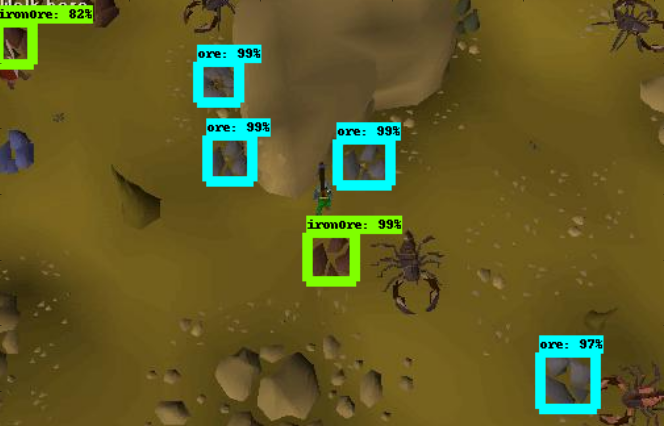
Leveraging the RuneLite client is an effective way to build a colour-picker bot for OSRS. RuneLite allows you to highlight NPCs and objects, which can then be used to detect interactable entities through pixel recognition. If implemented correctly, this method can result in a highly efficient and undetectable bot.
How It Works
- Highlighting Entities: RuneLite’s built-in overlays highlight NPCs and objects, making them stand out against the background. Your bot can identify these highlighted pixels using a colour-picker tool, allowing it to "see" the game environment dynamically.
- Random Pixel Selection: To avoid detection, your bot should pick a random pixel from the highlighted area each time it interacts with an NPC or object. This mimics human variability and ensures no two interactions are the same.
- Tracking Moving NPCs: By continuously scanning for the highlighted pixels, your bot can follow moving NPCs with precision. This is especially useful for tasks like combat or skilling, where NPCs or objects are not stationary.
Advantages
- Highly customizable: Adjust colour thresholds for precise targeting.
- Undetectable if randomness and variability are properly implemented.
- Works seamlessly with RuneLite’s overlays for real-time adaptability.
Example Use Case
Imagine a bot that automatically chops trees. The bot scans for RuneLite-highlighted trees, selects a random pixel from the highlighted area, clicks to chop the tree, and routes to the next tree using the minimap once the tree is depleted. This simple yet effective approach can be adapted for a variety of tasks in OSRS.
Final Thoughts
Building an undetectable OSRS bot requires an understanding of Jagex’s detection systems and a commitment to emulating human-like behavior. By leveraging tools like Gaussian randomness and mimicking natural interactions, you can greatly reduce your chances of detection.
Disclaimer: This guide is for educational purposes only. Botting violates OSRS’s terms of service and can result in permanent account bans. Use responsibly and at your own risk.